
What are user scenarios?
User scenarios describe the story and context of why a specific user or group of users comes to your site. They pay attention to the goals users want to achieve and the questions they bring, and sometimes describe the ways in which users can reach those goals on the website.
A user scenario is a structured description of a situation or event that a potential user of a product can experience while trying to achieve their goals. Scenarios are used at the product planning stage to break high-level market problems down into smaller problems, where more detailed requirements can be identified and documented.
A user scenario is a narrative that describes how a user can interact with a website or application. It names a specific task and tells how the user can perform it. The method has deep roots in human-computer interaction: John M. Carroll’s book Making Use: Scenario-Based Design of Human-Computer Interactions (MIT Press, 2000) argued that concrete stories about people using technology should drive design, rather than abstract specifications.
User scenario vs user story, use case and journey map
These terms are often mixed up, but each answers a different question:
- A user story is a one-sentence requirement for a development team, usually in the form “As a [type of user], I want [some goal] so that [some reason].” It is written from the user’s point of view, often by a product owner, and covers one piece of functionality. A scenario is longer and tells how and why a person reaches a goal.
- A use case is a technical description of the steps between a role and a system, including alternative paths and errors. A scenario is a narrative about the person’s experience and is usually less formal.
- A user journey map is a visual chart of every stage of the experience, with actions, thoughts, emotions and pain points. A scenario is a story about one goal, and often a single moment within a journey.
- A storyboard shows the scenario in pictures: sketches, screenshots or a short animation.
Types of user scenarios
Scenarios come in different levels of detail. The guidance once published on the US government site usability.gov distinguished three:
- Goal- or task-based scenarios: only what the user wants to do, without how. These are the scenarios you give participants in usability tests.
- Elaborated scenarios: more detail about the user’s story, background and circumstances, which helps the team create content that feels natural to them.
- Full-scale task scenarios: all the steps to complete the task, either the steps a user takes today or the ones you plan. They are close to use cases, but written from the user’s point of view.
The Interaction Design Foundation adds another axis. Prescriptive scenarios describe what should happen, often the “sunny day” in which everything works. Evocative scenarios give the user’s motivation and back story and build empathy. Good design work needs both, plus the rainy days: the errors, interruptions and dead ends.
How to create user scenarios?
User scenarios are created by clearly recording what interaction must take place for the task to be completed. The scenario should be understandable to people without a technical background, and cover more than the interaction with technology. User scenarios can therefore include cultural information and context, as well as a description of the circumstances that lead the user to the product or application. For example, a scenario about using a mobile app may mention that the user is on a train, or that the action is interrupted by an incoming call. This information helps developers adapt their designs to improve the usability and convenience of the application.
How to write a user scenario, step by step
- Find your users. You have to go beyond the project and determine who the real users are. What are their habits? Why do they need your product? Stay in touch with your real users and write a detailed persona for them.
- Learn more. Use your product yourself. Talk with users and discover the pain points in the design of the interface. Find out from your users whether they receive the information you want to communicate to them. Then you can go through the whole process based on their needs, experience and the results they expect.
- Choose one goal and the trigger. What happens that makes the user act now, and what counts as success for them?
- Set the scene: the place, the device, the time pressure, the people around and anything else that shapes the task.
- Build your scenario. Capture any idea that can help users understand, experience and use your product, even if it looks silly; a slightly absurd scenario is often the most memorable. Write a different scenario for different types of persona groups, so that you don’t design for only one kind of user.
- Add the obstacles and the ending. Describe what can go wrong, what the user does then, and how the story ends.
- Leave the interface out. Don’t name buttons, screens or colors: the scenario should leave room for ideas, not prescribe a solution.
- Review it with the team and check it against research or with real users.
The structure of a user scenario
In a user scenario we try to provide a framework for a number of related tasks that will ultimately lead the user to the desired goal. To do this, each user scenario must have a starting point and a desired end point that frame the tasks in between. Often the end point of one scenario is the starting point of the next, and scenarios are combined to describe the overall user experience.
Nielsen Norman Group breaks a scenario into five parts: the actor (a specific persona), the motivator (why the task comes up), the intention (what the actor needs), the action (what they do) and the resolution (how it ends). It also warns against too much detail: a scenario that mentions only a few high-priority needs leads to designs that fit many real situations, not just one story.
User scenarios should not be limited to situations in which the persona interacts with the product. They should be developed to cover the entire customer experience of the product, including marketing, sales, purchase and support. For the buyer, this becomes a buyer scenario.
What to consider when writing scenarios
Good scenarios are short, but they answer the following key questions:
- Who is the user? Use the personas developed to reflect the real main user groups coming to your site.
- Why does the user visit the site? Pay attention to what motivates the user to come to the site and what they expect when they arrive, if they expect anything.
- What are the goals of the user? Analyzing the tasks helps you understand what the user wants on your site, and so what the site must have to keep them satisfied.
- How can the user achieve their goals on the site? Determine how the user can reach the goal on the website, identifying the possible paths and potential barriers.
User scenario examples
Three short examples show what a finished scenario looks like. They are made up for this article, but each follows the structure above.
Online shop. Kate runs three times a week and has bought the same running shoes twice. On the train home, with 20 minutes and a weak signal, she notices a hole in one shoe. She wants the same model in the same size before Saturday’s race. On her phone, the search shows a new version of the model and she isn’t sure the size runs the same. Success: she finds her past order, reorders in a few taps and sees a delivery date before Saturday. The scenario points at order history, size information and delivery dates on mobile.
B2B software. Tom, a chief accountant, is asked by the CFO on the last day of the month why one supplier’s invoices went up. He has an hour before the board meeting and rarely uses the reports. Success: he filters by supplier, sees the two months side by side and exports a summary. The scenario shows that a ready comparison matters more to Tom than a flexible report builder.
AI support assistant. Late on Sunday, Anna writes to a shop’s chat assistant because a parcel marked as delivered never arrived. She is annoyed and wants a refund or a new parcel, not an explanation. The assistant has to check the order and hand her over to a person when it can’t decide. Success: within minutes she knows what happens next and when. Scenarios like this one are a good way to test AI in customer service, because they include the angry user, the missing data and the moment the machine should step back.
Scenario mapping: from stories to design ideas
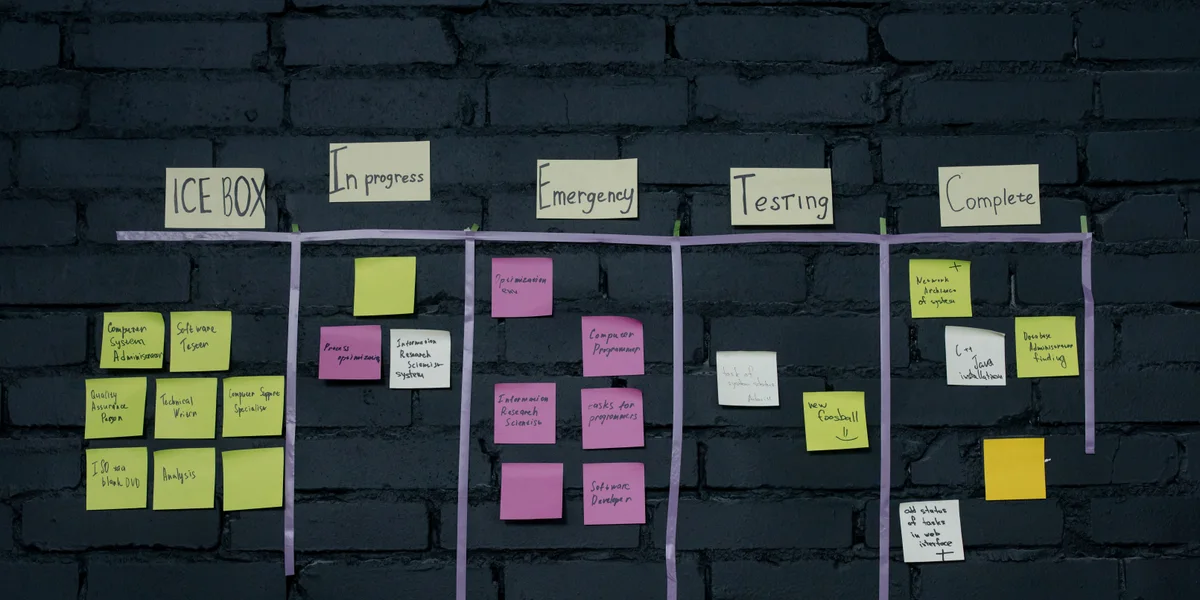
Once you have scenarios, you can use them to generate ideas. Nielsen Norman Group describes a scenario-mapping workshop: four to six people from different roles and one facilitator take one or two key-task scenarios for the top one or two personas. The scenario is split into four to six steps on sticky notes across a wall, with the persona, motivator and intention at the top. Participants spend 10 to 15 minutes adding design ideas, questions and comments under each step, each in its own color, then discuss every note briefly. Limit a session to two to four scenarios.
Map the same scenario for different personas, because they may approach a task differently, then look for the ideas they have in common and merge them into one design that works for all of them.
What are the benefits of using user scenarios?
When designing a customer-centric product development process, product managers constantly try to understand the unmet needs of the target customer. Scenarios help product management, marketing, the development team and vendors understand the context, when and where a new product or service can affect the target user or buyer.
Scenarios describe not only the context of each point of contact between the user and the product, but also the typical situations the user may meet during each decision, purchase and use.
User scenarios are especially useful in more complex situations, where many of them can be linked together and split into smaller, easier-to-manage parts. They are also very good at forcing product managers to look at problems through the eyes of the target market, instead of their own.
Scenarios also show where usability tests should be run and which tasks to test. In a test, give participants the goal-based version, without the steps, so you can see how they approach the task; keep the full version, with the main path and any alternatives, for the observers.
We all love telling stories. It is the oldest and most natural way to share information, and in UX design a scenario helps designers present a concept or a new product. More importantly, it is the most direct way to put users at the center of the design. Whatever you are building, it will ultimately be used by people, and a scenario brings them into the project even though they are not on the team.
User scenarios and AI tools
A language model can draft ten scenarios in a minute, and that is useful for a first list of situations to explore. It is not a replacement for research. When Nielsen Norman Group compared AI-generated “synthetic users” with real ones in 2024, the AI described idealized behavior, liked almost every idea and gave shallow priorities. Use AI drafts as hypotheses, then check them in interviews, analytics or usability tests before they shape the product.

 Any questions? Let's talk!
 Write to us,